Accessing Blogotex
There are four ways to log into Blogotex.com:
- Go to Blogotex Login and enter your username and password. This method requires an existing account and a set login password. Your Second Life® legacy name serves as the login.
- Go to Blogotex Login and click Use Second Life® Access Code. Enter your Second Life® username, and a unique code will be sent to your avatar in-world. Confirm the code to log in.
- If a brand uses Blogotex, they might have a Blogotex Access Point in their store. Click it to open the brand's application form, fill it and you'll be automatically logged in.
- For brand or event owners, click the bottom part of the Blogotex server and select Log In from the menu in-world.
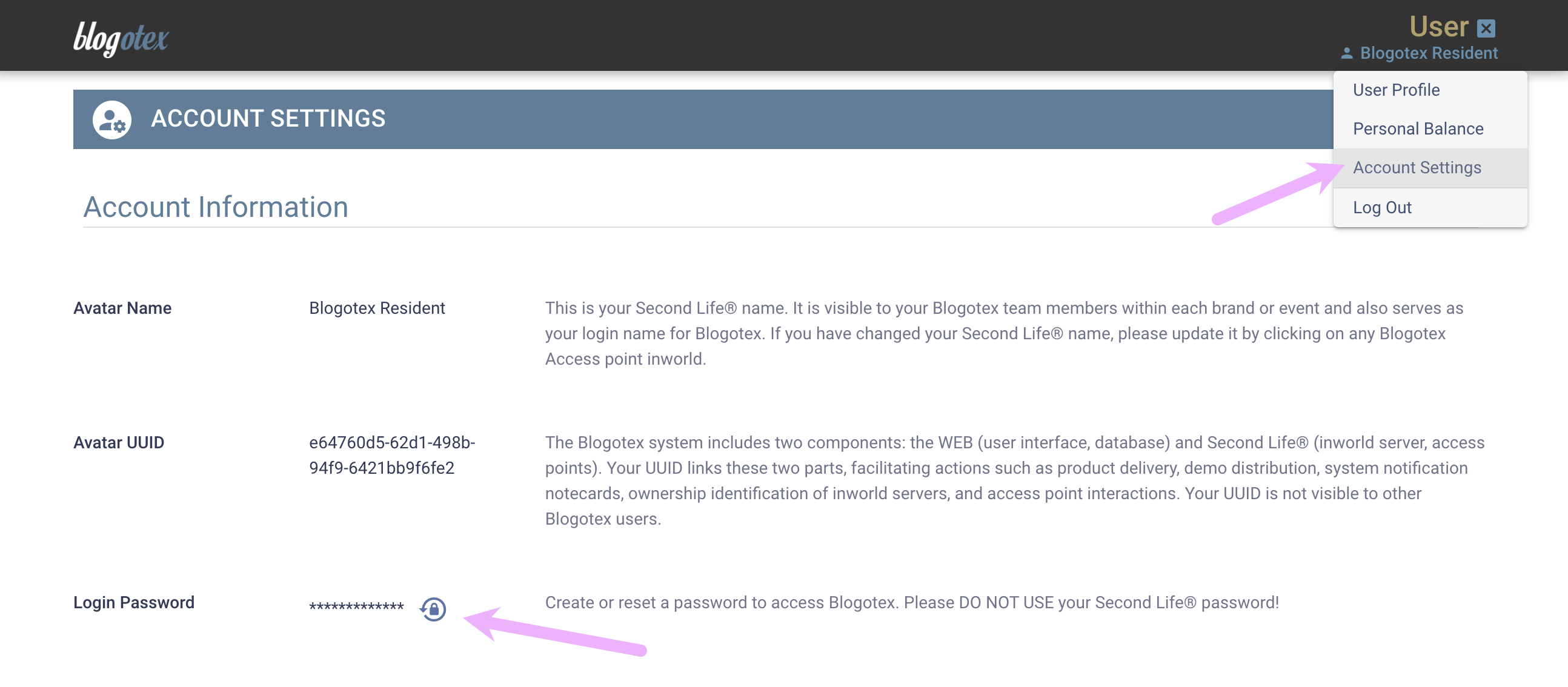
Setting or Changing a Password
Once you're in the system, you can set or change the password under your Account Settings.
Changing SL™ Legacy Name
Once you have changed your SL™ legacy name (not your screen name), you should update your Blogotex account’s name as well. Here’s how:
Go to any Blogotex Access Point in-world and give it a click. This will automatically fetch your new name and update your Blogotex account accordingly.
Once Blogotex has registered your name change, please provide your new name in the login form for further logins. The old name won’t work anymore. Your password remains the same as before.